Note-taking apps have evolved well beyond simple text storage into powerful tools for organizing knowledge, managing projects, and building personal or team wikis. Notion, Obsidian, and Evernote represent three distinct approaches to note-taking, each suited to different working styles. This guide compares them to help you choose the right fit.
Notion: The All-in-One Workspace
Notion combines note-taking with databases, task management, and collaborative workspace features, making it popular for both individual use and team collaboration. Its flexible block-based editing system allows users to build everything from simple notes to complex project trackers and wikis within a single connected workspace.
This flexibility comes with a learning curve — new users often need time to understand Notion’s building-block approach before they can fully leverage its more advanced organizational capabilities.
Obsidian: Networked Personal Knowledge
Obsidian focuses on building a personal knowledge base through interconnected notes, using a linking system that lets users connect related ideas across their notes, similar to how a wiki links related pages together. This networked approach appeals particularly to researchers, writers, and knowledge workers who value seeing connections between ideas over time.
Obsidian stores notes as plain text files on your own device by default, which appeals to users who prioritize data ownership and long-term file portability over convenience-focused cloud syncing, though cloud sync options are also available.
Evernote: Simple and Established
Evernote, one of the earliest popular note-taking apps, focuses on straightforward note capture, organization through notebooks and tags, and strong search capabilities, including searching text within images and scanned documents. It remains a solid choice for users who want reliable, simple note-taking without needing to learn a more complex organizational system.
Key Differences at a Glance
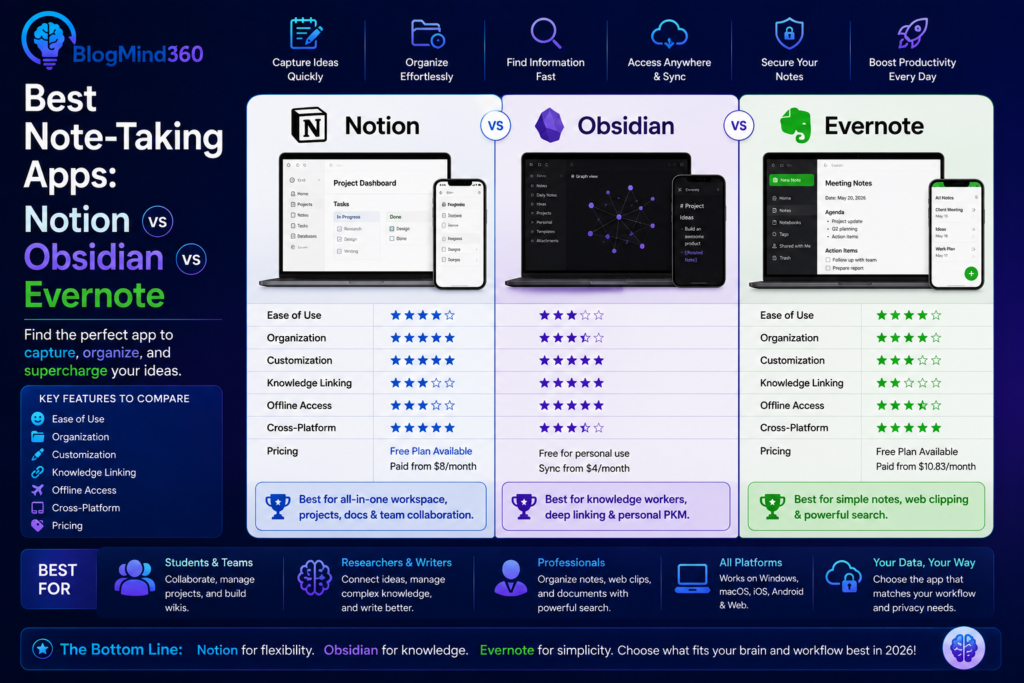
Notion excels at building structured, database-driven systems and collaborative team workspaces. Obsidian excels at helping individuals build a richly interconnected personal knowledge base, particularly for long-term thinkers and researchers. Evernote excels at simple, reliable capture and search, without requiring users to design their own organizational system from scratch.
Collaboration features also differ significantly — Notion is built with team collaboration as a core feature, Evernote offers more basic sharing capabilities, and Obsidian’s core experience is primarily designed around individual use, though some collaborative plugins exist.
Which One Should You Choose
If you need a flexible workspace for both notes and team collaboration, Notion is likely the strongest fit. If you want to build a deeply connected personal knowledge base and value owning your data as plain text files, Obsidian’s linking system offers unique advantages. If you want simple, reliable note capture without building your own organizational system, Evernote remains a solid, low-friction choice.
Frequently Asked Questions
Can I switch between these note-taking apps later if I change my mind?
Most offer export options, though the transition can require some reformatting since each app organizes information somewhat differently, particularly Notion’s database structures compared to plain text notes.
Which app is best for team collaboration?
Notion is generally considered the strongest of the three specifically for team collaboration, given its built-in shared workspace and database features.
Do these apps work offline?
Obsidian works fully offline by default since it stores notes locally, while Notion and Evernote offer offline access for previously synced content but generally require an internet connection for full functionality and syncing.
Is Obsidian harder to use than Notion or Evernote?
Obsidian’s linking-based approach can feel less intuitive initially for users accustomed to traditional folder-based note organization, though many users find it becomes more powerful as their note collection grows.
Are any of these apps free to use?
All three offer free tiers with core functionality, with paid plans unlocking additional storage, collaboration features, or advanced capabilities depending on the specific app.
Which app is best for students?
This depends on study style — Notion suits students who like building structured study systems and databases, while Evernote suits students who prefer simple, searchable note capture without extra setup.
Conclusion
Notion, Obsidian, and Evernote each represent a genuinely different philosophy toward note-taking — structured workspace, networked knowledge, and simple capture, respectively. Rather than one being objectively best, the right choice depends on whether your priority is team collaboration, building interconnected personal knowledge over time, or straightforward, reliable note-taking without a learning curve.